Grammar Check by AI Writing
- 4.3
- Rating
- 1.00M
- Installs
- Free
- Price

 Analysis by App-foxy
When I need to clean up a message, polish a paragraph, or find a better way to express an idea, I usually want help without opening a full desktop editor. Grammar Check by AI Writing is built for that exact moment. I tested it as an everyday writing companion rather than treating it like a replacement for a professional editor, and that distinction matters. It is a free education app from Metaverse Labs that brings grammar checking, paraphrasing, autocorrection, dictionary help, and writing assistance into one mobile-focused experience.
My first impression was that its appeal comes from convenience. Instead of moving between a dictionary, a correction tool, and a separate paraphrasing service, I can keep the basic writing workflow in one place. That makes it especially useful for quick notes, school assignments, work messages, and anyone writing in a language they are still learning. It is available to everyone, supports devices running Android 7.0 or later, and has reached over a million installs. Its average rating sits at 4.3 from around 24 thousand ratings, which suggests that many people find the general idea useful, even though a rating alone cannot tell me whether it suits my particular writing habits.
How I would decide whether it belongs on your phone
I would begin with the kind of writing you do most often. If you mainly need short corrections while composing messages or checking a paragraph before sending it, the app makes a sensible first choice. If you write long academic papers, legal documents, or publication-ready material, I would be more cautious. A mobile writing assistant can identify obvious problems and suggest clearer wording, but it should not replace your own judgment or a careful human review when precision is important.
You May Also Like

 Blood Strike: 2.5 Anniversary
Blood Strike’s Loadouts Turn Every Drop Into a Tactical Gamble
A close look at Blood Strike’s custom loadouts: how fast access to signature weapons reshapes its battle royale rhythm, rewards preparation, and narrows the gap between fights.

 Pandora - Music & Podcasts
Pandora’s Music Is Easy to Start, but Harder to Recover
Pandora’s strength is its low-effort path from a seed to a station. Its weak spot is how much confidence it asks you to place in connection, setup, and quiet recovery.

 8 Ball Pool
 Is Built on Rivalries, Rematches, and Routine
A close look at the rivalries, rematches, shared routines, and unanswered safety questions that turn a quick pool match into a persistent mobile community.

 Samsung Music
’s Quiet Strength Is Playing What You Already Own
Its reach comes less from spectacle than from dependable access to a personal library. That simplicity is both the app’s strongest retention engine and its ceiling.

 AccuWeather: Weather Radar
AccuWeather Review: A Quick, Clear Forecast for Everyday Decisions
For everyday plans, the best forecast is the one you can understand quickly. AccuWeather makes rain timing, radar, and local conditions easy to act on, with a few trade-offs.

 Hill Climb Racing
Why Hill Climb Racing Still Turns Crashes Into One More Run
A tiny car, a bumpy hill and one more upgrade: Hill Climb Racing keeps resurfacing because its simple chaos makes every near-miss feel personal.
More From Our News Desk



The second question is whether you want several small tools together or one highly specialized tool. Grammar Check by AI Writing is positioned as a broad assistant: its store summary points to grammar checking, paraphrasing, autocorrection, dictionary support, and general writing help. That combination is more practical for casual users than installing separate apps for every task. The trade-off is that a broad tool may feel less focused than a dedicated editor designed around one particular writing environment.
I also considered how much manual control I wanted. Automatic corrections are convenient, but they can sometimes change tone or meaning. My best results came when I treated every suggestion as an option rather than pressing accept repeatedly. This is an important habit with any AI-assisted writing tool: the app can improve surface-level clarity, but I remain responsible for deciding whether the revised sentence still sounds like me.
There is also a useful distinction between correction and rewriting. A correction should preserve the idea and fix the language. Paraphrasing can go further, changing the structure and sometimes the emphasis. I would use the correction side for a work email or a message to a teacher, while reserving paraphrasing for a rough draft that feels repetitive. Mixing those two jobs without checking the result is where mistakes are most likely to appear.
A realistic everyday workflow
Imagine that I have written a short message to a landlord, teacher, or manager. I know what I want to say, but the wording feels awkward. I would paste the draft into the app, check the grammar suggestions first, and read the corrected version aloud. If the sentence is still clumsy, I would try paraphrasing once, then compare the new wording with my original. Finally, I would use the dictionary function to verify a word whose meaning or tone I am unsure about. This order is safer than immediately asking for a complete rewrite because it lets me preserve the details and intention of the original message.
For students, the same workflow can help with a draft introduction or conclusion. I would not use it to disguise copied work or submit unreviewed generated text. Instead, I would use the suggestions to notice recurring problems, such as missing articles, unclear sentence structure, or repeated vocabulary. The educational value is strongest when the user asks why a sentence feels wrong and learns from the correction rather than simply replacing the original.
What makes the combined tool useful
The strongest part of the experience is the way the functions support different stages of writing. Grammar checking is useful after drafting. Autocorrection helps during quick composition. The dictionary is valuable when I am choosing between similar words. Paraphrasing is most helpful when the meaning is sound but the sentence lacks variety. These are not identical features, and using each one at the right stage produces better results than expecting a single button to solve everything.
I particularly like the possibility of using the dictionary as a decision tool rather than merely looking up definitions. When I am unsure whether a word sounds too formal, too casual, or simply unnatural in context, checking its meaning before accepting a rewrite helps me keep control of the tone. This is a small but important habit, especially for non-native English writers who may recognize a word without fully understanding how it is normally used.
Another practical insight is to keep the original draft before experimenting with paraphrasing. A rewritten sentence may sound smoother but lose a qualification, a date, or the exact level of certainty I intended. I would copy the original into a note, test one paragraph at a time, and compare both versions. That extra step takes very little time and prevents the common problem of improving grammar while accidentally weakening meaning.
The app also makes sense for people who switch between informal and formal writing. A text message, a cover letter, and a classroom paragraph should not sound identical. I would use autocorrection for speed in casual writing, but I would inspect paraphrased suggestions more carefully in formal work. A polished sentence is not automatically an appropriate sentence; tone depends on the relationship with the reader and the purpose of the message.
Where it fits better than the usual alternatives
Compared with relying only on a phone keyboard, this app offers a more deliberate review step. A keyboard can fix obvious typing errors while I write, but it is not the same as reconsidering an entire sentence. Grammar Check by AI Writing is more useful when I already have a draft and want to examine it as a complete piece of writing.
Compared with a dictionary app, it is more convenient for users who need both word help and sentence-level assistance. A dictionary remains the better choice when I want deep reference material or a focused definition, but this app is quicker when the question is connected to a sentence I am actively composing.
Compared with a dedicated desktop grammar editor, the advantage is portability and a simpler mobile workflow. I can use it when I am away from my computer or when a message is too short to justify opening a full writing suite. The likely compromise is depth: people who need detailed style controls, extensive document management, or advanced professional editing may prefer a specialized alternative.
Compared with a pure paraphrasing tool, the broader feature set is more balanced. I am less likely to treat every writing problem as a request for a rewrite because grammar checking and dictionary support are available alongside paraphrasing. That said, users who only want creative rewording may find a dedicated paraphrasing service more direct, while users who only need spelling fixes may prefer the keyboard they already use.
Limitations I noticed in the decision
The biggest limitation is not necessarily a missing button; it is the need to review suggestions carefully. Automated writing help can make a sentence more fluent without making it more accurate. Names, technical terms, personal details, and carefully worded requests deserve a second look. I would never paste a sensitive or high-stakes document into an assistant and send the result without reading every line.
There is also a learning curve in knowing which feature to choose. Someone expecting one universal “fix everything” action may become frustrated when a correction, paraphrase, and dictionary lookup produce different kinds of help. The app works better when I approach it as a small toolkit. That may sound obvious, but it changes the experience from trial and error into a repeatable writing process.
Another consideration is the pricing model. The app is free to download and use as a starting point, while in-app purchases range from $3.99 to $99.99 per item. I would check the available options inside the app before committing to regular use, especially if I only need occasional corrections. A free entry point is helpful, but the value of any paid upgrade depends on how frequently I write and which functions I actually use.
Its current version is 2.0.0, and that makes it sensible to keep expectations practical rather than assuming it will behave like a mature desktop publishing tool. I would evaluate it on short, real tasks from my own routine: a message, a paragraph, a school draft, and a word choice. That test tells me more than trying to judge it with an artificial sample designed to make any writing assistant look impressive.
Who should use it and who should choose something else
I would recommend it to students who want a second look at drafts, multilingual users who need help with English phrasing, professionals who write frequent short messages, and casual writers who dislike switching between several apps. It is also a good fit for someone who wants to learn from corrections instead of relying entirely on a keyboard’s automatic fixes.
I would be less enthusiastic for a novelist, researcher, editor, or business user who needs a deep long-document workflow. Those users may benefit more from a specialized writing environment with stronger document organization and more detailed control. I would also suggest skipping it if you never review suggested changes yourself. No writing assistant can make responsible decisions about context, privacy, or personal voice on your behalf.
For younger users, the Everyone age rating makes the app broadly approachable, but adults should still encourage good writing habits. The most useful lesson is not that an app can correct every sentence; it is that writing improves when the author pauses, checks meaning, and chooses words intentionally.
The cost of making it part of a routine
The practical cost is not just money. It is also the time spent moving text into the app, comparing suggestions, and correcting changes that do not fit. For a two-line message, that process may be unnecessary. For a paragraph that matters, it can be worthwhile. I found the best balance by using it selectively instead of sending every sentence through a check.
Before considering an in-app purchase, I would spend several days identifying my real need. If grammar mistakes are the main problem, correction may be enough. If my writing is accurate but repetitive, paraphrasing may matter more. If word choice is the obstacle, the dictionary could be the feature I return to most. Paying for a broad package makes more sense when I use several parts regularly, not simply because the app contains them.
Switching from a familiar keyboard or desktop editor also has a small workflow cost. I may need to copy text, review a second version, and move the final wording back to where I plan to use it. That is acceptable for important messages and short drafts, but it can feel slow during rapid conversations. In those moments, the phone keyboard remains the faster alternative.
My recommendation after using it
My overall view is positive, with a clear condition: use Grammar Check by AI Writing as a careful assistant, not as an automatic author. The combination of grammar checking, paraphrasing, autocorrection, dictionary support, and writing help gives it more everyday range than a single-purpose correction tool. I appreciate that it can support both quick fixes and more thoughtful revision, especially when I work in short sections and preserve the original text.
Its free starting point makes it easy to try, and the broad Everyone rating means it can serve a wide group of writers. The large install base and 4.3 average also indicate that it has found a substantial audience. Still, I would not choose it solely because of popularity. I would choose it if I wanted a mobile writing toolkit and was willing to check every suggestion for meaning, tone, and accuracy.
The best reason to install it is convenience with responsibility. It can help me turn a rough sentence into a clearer one, find a more suitable word, or notice a grammar problem before someone else does. It is not the right choice for every writing task, and dedicated alternatives may be better for long, complex, or highly sensitive documents. For everyday mobile writing, though, Grammar Check by AI Writing is a practical option to test before deciding whether a more specialized service is worth the extra complexity or cost.
FAQs for Grammar Check by AI Writing
01What is Grammar Check by AI Writing, and what does it do?
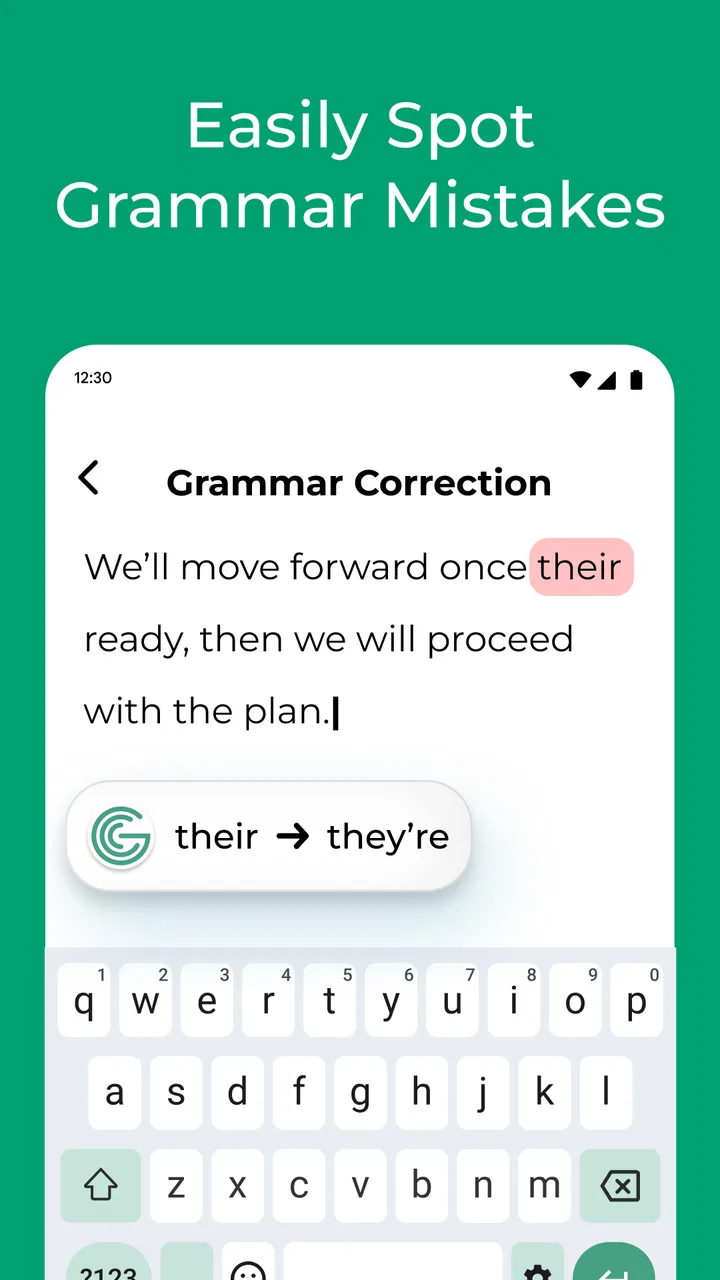
Grammar Check by AI Writing is a writing assistant designed to review text and identify common grammar, spelling, punctuation, and style mistakes. After entering or pasting your content, the app highlights possible problems and may suggest clearer or more natural alternatives. It can be useful for emails, school assignments, social media posts, work documents, and everyday writing, although its suggestions should still be reviewed before you accept them.
02Is Grammar Check by AI Writing suitable for students and professional writers?
The app can be helpful for both students and professionals because it provides quick feedback without requiring advanced editing knowledge. Students may use it to polish essays, reports, and applications, while professionals can check emails, presentations, articles, and business messages. However, it should be treated as an editing aid rather than a replacement for learning grammar or having important documents reviewed by a qualified person.
03Does Grammar Check by AI Writing support different languages and writing styles?
Language and style support can vary depending on the version of the app, your device, and the features available under its current plan. English correction is generally the main focus, while additional languages or tone options may be limited. Before downloading, check the app listing for supported languages. You should also test the suggestions with your preferred style, since AI recommendations may occasionally sound unnatural or change your intended meaning.
04Is Grammar Check by AI Writing free to use?
The app may offer free access to basic grammar or spelling checks, but advanced features can require in-app purchases or a subscription. These features may include unlimited corrections, rewriting tools, tone adjustments, longer text processing, or an ad-free experience. Pricing and trial conditions can change, so review the current store listing carefully, especially the renewal terms, billing frequency, and cancellation instructions before starting any subscription.
05Can I trust Grammar Check by AI Writing with private or sensitive text?
You should be careful when entering confidential information into any AI writing application. Text may be processed online, depending on how the service operates, so avoid submitting passwords, financial details, private legal documents, medical information, or proprietary business content unless you have confirmed the app’s privacy practices. Read its privacy policy and permissions, and remember that automated corrections can sometimes misinterpret sensitive context or produce unsuitable suggestions.
Pros
- Quickly detects grammar
- spelling
- and punctuation mistakes.
- AI suggestions can improve clarity
- tone
- and sentence structure.
- Useful for emails
- essays
- messages
- and professional documents.
- Simple interface makes corrections easy for beginners to understand.
- Helps users learn from repeated writing mistakes over time.
Cons
- AI suggestions may occasionally change the intended meaning.
- Some advanced correction tools may require a paid subscription.
- Requires an internet connection for many AI-powered features.
- Privacy-conscious users may hesitate to submit personal text.
- Long documents can take more time to analyze and process.

Grammar Check by AI Writing
Gallery